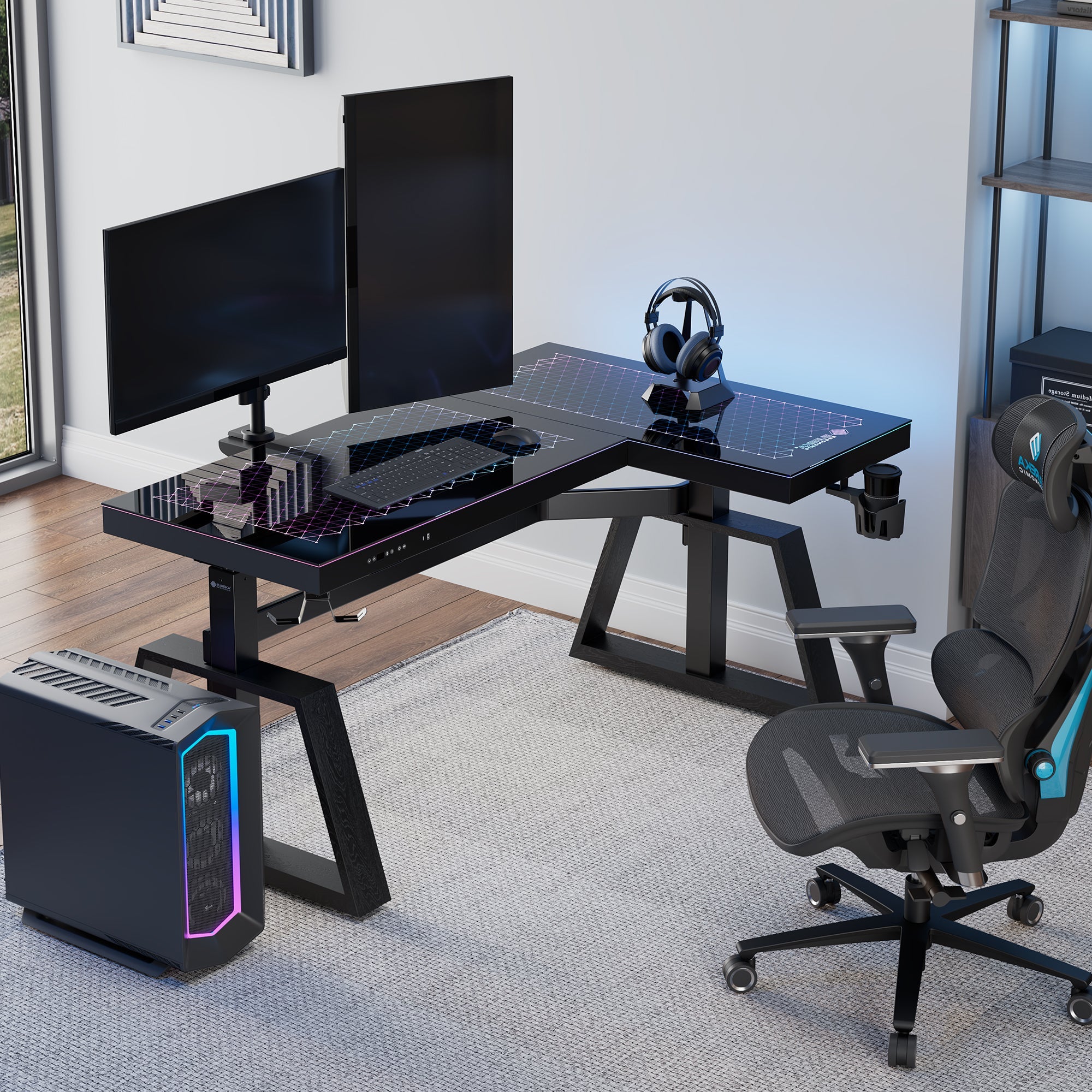
Boost Your Performance: Ergonomic Gaming Desk Setup Essentials
In the competitive world of gaming, every advantage counts. While high-end hardware often gets the spotlight, the foundation of a truly optimized experience lies elsewhere: your ergonomic gaming desk setup. Far more than just a place to put your PC, a thoughtfully designed setup can dramatically sharpen your focus, improve reaction times, and ensure you remain comfortable and pain-free through even the longest gaming marathons. It's the silent partner in your pursuit of peak performance, directly impacting not only your scores but also your long-term health.
This comprehensive guide will delve into the essentials of creating a high-performance, ergonomic gaming space, transforming your gaming area from merely functional to truly formidable.
Why Your Setup Matters: Performance & Health Synergy
The link between your gaming environment and your in-game performance is undeniable. Imagine trying to execute a critical maneuver with a mouse cable snagging, a cluttered desk distracting your peripheral vision, or an uncomfortable chair forcing you to constantly shift. These seemingly minor annoyances add up, breaking your concentration and slowing your reflexes. An organized, well-lit, and intuitively arranged space, on the other hand, allows every movement to feel smoother and more precise, helping you stay "locked in" during crucial moments.
Equally critical, and often overlooked, is the impact on your long-term health. Hours spent hunched over a non-ergonomic setup can lead to a litany of issues: chronic back pain, debilitating wrist strain (like carpal tunnel syndrome), and severe eye fatigue. An ergonomic setup actively works to prevent these problems. By supporting healthy posture, minimizing repetitive strain, and reducing stress on your eyes and body, you're not just playing more comfortably today; you're safeguarding your ability to enjoy gaming for years to come. It's a fundamental investment in both your immediate prowess and your future well-being.
Optimizing Your Gaming Space: Smart Layouts & Vertical Solutions
Whether you're working with a sprawling dedicated room or a cozy corner, smart space optimization is key to creating an efficient and inviting ergonomic gaming desk setup. Even small areas can feel expansive with strategic planning.
1. The L-Shaped Command Center
For those with a corner or a bit more room, an L-shaped desk is a game-changer. This configuration effectively doubles your usable surface area, allowing you to create distinct "zones." One side can be dedicated entirely to your main gaming rig, providing ample room for wide mouse movements and dual monitors. The other wing can house streaming equipment, a separate workstation, or study materials, keeping your primary gaming area free from clutter and distractions. This intelligent division of space enhances both organization and focus.
2. Leveraging Verticality
When you can't build outwards, building upwards is your best friend. Utilizing vertical space keeps your primary desk surface clear and organized.
- Monitor Arms: Ditch those bulky monitor stands! Clamp-on or grommet-mounted monitor arms instantly free up valuable desk space. More importantly, they offer unparalleled control over your screen's height, angle, tilt, and even orientation (portrait or landscape). This allows for precise ergonomic adjustments, bringing your monitors to eye level and preventing neck strain. For multi-monitor setups, they're indispensable.
- Wall-Mounted Shelves: Above your monitor, wall-mounted shelves provide ideal storage for speakers, collectible figures, game cases, or even books. They keep these items readily accessible but completely off your desk, contributing to a cleaner, more focused aesthetic.
- Pegboards: A versatile and customizable solution, wall-mounted pegboards offer a flexible way to hang controllers, headsets, cables, and other frequently used peripherals. Some even allow for shelving attachments, letting you store smaller items in an organized, accessible manner. They’re a fantastic way to personalize your space while maintaining tidiness.
3. The Minimalist's Dream
Sometimes, less truly is more. A minimalist ergonomic gaming desk setup strips away all non-essentials, focusing solely on core performance components: a high-refresh-rate monitor, a compact keyboard, a reliable mouse, and a quality headset. With everything else neatly stored out of sight, you gain maximum movement space and eliminate visual distractions, leading to enhanced concentration and a serene gaming environment. This approach can also be surprisingly cost-effective and easier to keep tidy.
4. Under-Desk PC Mounts
A PC tower, whether a compact mini-ITX or a monstrous full-tower, consumes significant space. Mounting your PC tower beneath your desk keeps it safe from accidental kicks and dust on the floor, while simultaneously freeing up legroom and valuable surface area. Many mounts also allow for better airflow around your system, potentially contributing to cooler operation.
The Core of Comfort: Ergonomic Seating and Display Placement
True comfort is the bedrock of sustained performance. When discomfort creeps in, fatigue follows, and your focus inevitably slips. Ergonomics isn't about adapting yourself to your setup; it's about designing your setup to perfectly adapt to you.
1. The Ergonomic Gaming Chair: Your Throne
The gaming chair is arguably the most critical component of an ergonomic gaming desk setup. A premium gaming chair should be highly adjustable, allowing you to fine-tune every aspect to support your body's natural curves. Look for:
- Adjustable Height: To ensure your feet are flat on the floor (or a footrest) and your knees are at a 90-100-degree angle.
- Lumbar Support: Crucial for maintaining the natural inward curve of your lower back, preventing slouching and pain. Ideally, this should be adjustable in both height and depth.
- Armrests: Height, depth, and pivot adjustable (3D or 4D armrests) allow you to support your forearms, keeping your shoulders relaxed and reducing strain on your wrists and elbows.
- Backrest Recline and Tilt: To find the most comfortable angle for different activities, from intense gaming to casual browsing.
- Headrest: To support your head and neck, preventing strain when leaning back.
Investing in a high-quality ergonomic gaming chair is an investment in your long-term health and gaming longevity.
2. The Adjustable Desk: Your Flexible Foundation
A good gaming desk should be robust enough to hold multiple monitors and deep enough to place them at a comfortable distance from your eyes. However, for true ergonomics, adjustability is paramount. An adjustable height desk (often a standing desk) is the ultimate solution. It allows you to:
- Perfectly match the desk height to your ergonomic chair, ensuring optimal arm and wrist positioning.
- Switch between sitting and standing throughout long sessions, promoting circulation, reducing stiffness, and combating the negative effects of prolonged sitting. This can significantly reduce fatigue and improve focus.
Ensure your desk is also deep enough to allow your monitors to be at an arm's length (or more) away from your eyes to reduce eye strain.
3. Optimal Monitor Placement
Even with the best chair and desk, poor monitor placement can lead to neck strain and eye fatigue. Here's the ideal setup:
- Eye-Level Viewing: The top third of your primary monitor should be level with your eyes. This prevents you from constantly craning your neck up or down.
- Arm's Length Distance: Sit an arm's length (about 20-30 inches) away from your screen. If you have multiple monitors, ensure they are angled slightly towards you.
- Glare Reduction: Position your monitors to avoid direct glare from windows or overhead lighting. Matte screen finishes or anti-glare filters can also help.
Finer Details: Lighting, Cable Management & Ergonomic Peripherals
While the big-ticket items form the backbone of your ergonomic gaming desk setup, the smaller details can elevate it from good to exceptional.
1. Strategic Lighting
Good lighting is crucial for both comfort and immersion. Avoid harsh overhead lights that can cause glare. Instead, opt for:
- Bias Lighting: LED strips behind your monitors reduce eye strain by balancing the light contrast between your screen and the surrounding area.
- Ambient Lighting: Soft, indirect room lighting (e.g., smart bulbs, desk lamps with diffusers) creates a comfortable atmosphere without glare.
- Task Lighting: A dedicated desk lamp can provide focused light for non-gaming tasks without affecting screen visibility.
RGB lighting can also add a personalized aesthetic touch, enhancing the gaming mood.
2. Impeccable Cable Management
Tangled cables are not just an eyesore; they're a hazard. They can impede mouse movement, restrict airflow, and create tripping hazards. Effective cable management is essential for a clean, efficient, and truly ergonomic gaming desk setup.
- Cable Trays and Sleeves: Mountable trays under your desk can neatly hide power strips and excess cable slack. Cable sleeves bundle multiple wires together for a streamlined look.
- Cable Ties and Clips: Use reusable Velcro ties or adhesive clips to route cables along desk legs or walls, keeping them organized and out of the way.
- Wireless Peripherals: Where possible, opt for wireless mice, keyboards, and headsets to reduce cable clutter significantly.
3. Ergonomic Peripherals
Your interaction points are just as important as your seating and display.
- Keyboard: Consider a compact keyboard (TKL, 60%, or 65%) to maximize mouse space. Add a comfortable wrist rest to maintain a neutral wrist position.
- Mouse: Choose a mouse that fits your hand size and grip style. Experiment with DPI settings to minimize large, repetitive wrist movements. A large, smooth mouse pad is also beneficial.
- Headset: A lightweight, comfortable headset with breathable ear cups is vital for long sessions, preventing ear fatigue and pressure points.
Conclusion
An ergonomic gaming desk setup is more than just a collection of accessories; it's a carefully crafted ecosystem designed to enhance every aspect of your gaming experience. By prioritizing proper posture, optimizing your space, and paying attention to crucial details like lighting and cable management, you're not just improving your in-game performance—you're investing in your long-term health and comfort. Take the time to implement these essentials, and you'll soon discover a new level of focus, precision, and enjoyment that will keep you at the top of your game for years to come.